Voice Caddie SC4 Pro
A built-in screen, spin metrics, and E6 simulator compatibility at a price that undercuts most rivals. The most complete entry-level simulator package available.
£480
Check current UK retailer pricing. 5 E6 courses included. VoiceCaddie S app free. No mandatory subscription for basic use.
Key features
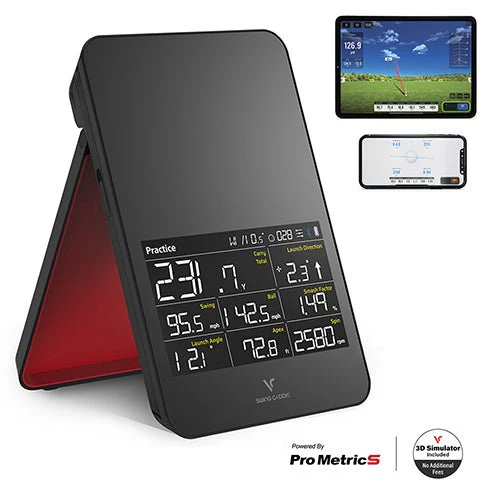
- Built-in screen — carry distance, launch direction, swing speed, ball speed, smash factor, launch angle, apex, spin rate displayed without phone
- Doppler radar — K Band 24GHz
- ProMetrics engine — adds side spin, spin axis, backspin, and dispersion via app
- 8 metrics on device, more via app
- E6 Connect compatibility — 5 courses included free, more available via optional subscription
- VoiceCaddie S app — free, 3D driving range, advanced stats, shot tracking
- Voice output — spoken distance feedback after each shot
- Magnetic remote control for club selection and settings
- Swing Speed Mode — measures speed without hitting a ball
- Target Mode for accuracy practice
- Works indoors and outdoors
- Bluetooth connectivity to phone or tablet
- No specially marked balls required — works with standard golf balls
- 10 hour battery life
- Rechargeable Lithium-ion 7,500mAh
- Placement: 5ft behind ball
Our view
The Voice Caddie SC4 Pro makes a strong argument at around £480. It is one of the only launch monitors at this price with all three of: a built-in screen, spin metrics, and E6 simulator compatibility. Most devices at this price point compromise on at least one of those three things.
The built-in screen is the most practically useful feature for golfers who want data without the friction of phone pairing. Carry distance, ball speed, smash factor, launch angle, and spin rate are all displayed immediately after each shot. The magnetic remote control means you can select clubs and adjust settings from the hitting area without walking back to the device. Voice output calls out your distance after each shot — useful for range sessions where you want to stay in your routine.
The ProMetrics engine adds spin axis, side spin, backspin, and dispersion when connected to the VoiceCaddie S app. These are meaningful additions — spin data at this price point is unusual and gives golfers insight into shot shape and curvature that most budget devices cannot provide.
The E6 integration is a genuine bonus. Five courses are included free with no ongoing subscription required for basic use — if you just want to play virtual golf on those five courses, you can do so from day one at no extra cost. Additional courses are available via E6 subscription if you want more.
The honest limitations are the app. Earlier Voice Caddie app versions received criticism for usability. The VoiceCaddie S app is an improvement, though Android support was still in development at time of writing — check current compatibility before purchasing if you are an Android user. When connected to the app, the built-in screen switches to SIM mode and shows no individual shot data — a quirk worth knowing about.
Independent reviews note that when the device is connected to the app you lose the built-in screen data, which feels like a design compromise. The indoor accuracy is solid for the price provided setup guidelines are followed carefully.
Pros
- Built-in screen with 8 metrics — no phone required for basic use
- Spin metrics via ProMetrics engine — unusual at this price point
- 5 E6 courses included free — no subscription needed to start
- Voice output and magnetic remote for a smooth range session routine
- Works with standard golf balls — no special balls or stickers needed
- Swing Speed Mode without ball
- VoiceCaddie S app free with 3D range and advanced stats
- 10 hour battery life
- Solid indoor and outdoor performance
Cons
- When connected to the app, built-in screen shows SIM mode only — no individual shot data on screen
- Android app support not fully available at launch — check current status before buying
- App usability received mixed reviews on earlier versions
- No angle of attack measurement
- No club path measurement
- Placement sensitivity — setup guidelines must be followed carefully for accurate indoor data
Who is this for?
| Handicap 0–12 | Low handicap | Good |
| Handicap 13–20 | Mid handicap | Ideal |
| Handicap 21–28 | High handicap | Ideal |
| Handicap 28+ | Beginner | Good |
The SC4 Pro suits mid and high handicap golfers who want a complete practice and simulator package without spending over £500. The combination of built-in screen, spin data, and free E6 courses makes it the most complete entry-level package available. iPhone users will get the best experience — Android users should check app compatibility before purchasing. Golfers who want club path, angle of attack, or a more polished app experience should look at the Rapsodo MLM2PRO or Garmin R10.
Key specifications
| Technology | Doppler radar K Band 24GHz, ProMetrics engine |
| Display | Built-in screen plus smartphone via Bluetooth |
| On-screen metrics | Carry distance, total distance, swing speed, ball speed, smash factor, launch angle, apex, spin rate (8 metrics) |
| App metrics | Side spin, spin axis, backspin, dispersion |
| App | VoiceCaddie S (free, iOS — Android coming) |
| E6 courses | 5 courses included free (E6 Connect, iOS and PC). More via optional subscription. |
| Indoor use | Yes (5ft behind ball) |
| Outdoor use | Yes |
| Battery life | 10 hours (7,500mAh Lithium-ion) |
| Charging | 6 hours from drained |
| Weight | 20.79oz (approx 590g) |
| Dimensions | 4.88 x 7.59 x 1.14 inches |
| Placement | 5ft behind ball, same level as ball |
| Measuring range | 15 to 370 yards carry |