
What these apps do
A phone and a tripod. That is all you need.
Swing analysis apps use your phone's camera to record your swing in slow motion and give you feedback on your mechanics. The best ones do this automatically — you set up the phone, hit balls, and the app detects each swing, trims the video, and replays it immediately. No assistant required.
The category has split clearly in 2026. Some apps are primarily video tools with drawing and comparison features — useful for self-coaching and for sharing with an instructor. Others now include genuine AI analysis that identifies specific faults, sets goals, and prescribes drills. And one app in this guide — Shot Tracer — does something completely different: it traces ball flight for video content rather than analysing your swing mechanics. We have included it because it is frequently searched alongside the others, but it belongs in a different category.
Before you download
If you already have a PGA professional or coach, ask which app they use before choosing one. V1 Golf and Coach Now have large instructor networks — if your coach uses one of these platforms, working within the same system gives you far more value than using a different app independently. If you do not have a coach, Swing Profile and Sportsbox AI both work well as standalone self-coaching tools.
Quick answer
For most club golfers starting out: download Swing Profile free — hands-free auto-capture shows you your swing immediately without any setup. If you work with a coach, ask which platform they use before choosing. If you want 3D body motion data, Sportsbox AI is the most technically capable phone-based option available.
App reviews
Every major swing analysis app reviewed.
Swing Profile
iOS · Android · iPad · macOS (M1 chip required)4.6 from 1,500 ratings (iOS) · PGA Merchandise Show "Best Overall Product" 2012
Free version
Save up to 3 recordings. 5 auto-replay sessions per hour. 10 ball tracker sessions per hour. 1 voice-over recording per hour. Auto swing detection, auto replay in slow motion, auto swing plane reference lines, auto swing sequence (Golf Digest style), auto ball tracking, auto sync with pro swing for comparison. No sensor required.
Elite — $49.99/year (currently 50% off, regular $99.99/year) or $8.99/month
Unlimited recordings and sessions. Unlimited auto replay. Unlimited ball tracker. Unlimited voice-over recordings. Auto backup. 5GB cloud storage for backup and video sharing. All free features with no session limits.
Coach — $99.99/year (currently 50% off, regular $199.99/year) or $19.99/month
Everything in Elite plus: Student lockers to organise videos by student. Fast video sharing to students. Coach Directory listing for student discovery. Custom branding on videos and sequences. 25GB cloud storage.
Pricing in US dollars. Elite approx £40/year at current rates. Discounted pricing available at time of writing — check current price before subscribing. Coach tier is designed for teaching professionals managing multiple students.
Our view
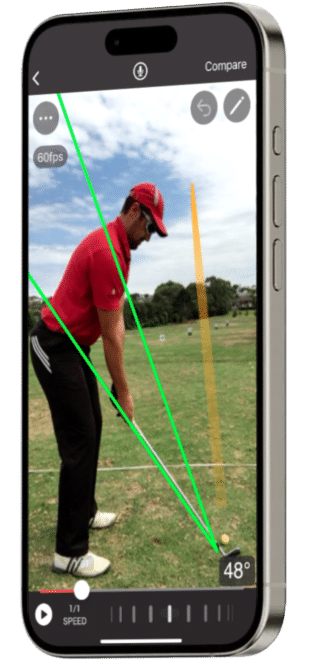
Swing Profile's headline feature is genuine hands-free operation. Set your phone on a tripod or holder, hit balls, and the app automatically detects each swing, trims the video to the two-second swing motion, and replays it in slow motion immediately after the shot. You do not need to touch the device between shots. For solo practice sessions at the range or on the course, this removes the biggest friction point of swing analysis — needing someone to operate the phone for you.
The automation goes further than just capture. The app automatically draws standard reference lines on the video, generates Golf Digest-style swing sequence photos from each swing, tracks ball flight trajectory, and synchronises two swings for comparison. All of this happens without manual input. The result is that you can hit a bucket of balls and come away with a library of analysed swings, each with reference lines already drawn and ball flights tracked.
The Twin-Cam feature is worth noting specifically. Using two devices simultaneously — a phone and an iPad, or two phones — the app captures both face-on and down-the-line views of the same swing in a single session. This is the same two-angle analysis a teaching professional would use, achievable without a second person present.
The free tier is genuinely functional for occasional use — three saved recordings and limited sessions per hour is enough to assess your swing. The Elite subscription at approximately £40 per year removes all limits and adds cloud backup. The Coach tier is aimed at teaching professionals and adds student management tools.
The honest note is that Swing Profile is a video capture and analysis tool rather than an AI coaching platform. It shows you your swing clearly and draws reference lines automatically, but it does not diagnose faults or prescribe drills the way Sportsbox AI does. For golfers who know what they are looking for in their swing — or who share videos with a coach — it is an excellent and efficient tool. For golfers who want the app to tell them what is wrong, the AI analysis apps in this guide go further.
Free version verdict
Functional for occasional use — three saved recordings and limited sessions. Enough to evaluate the app before subscribing.
Best for
Solo range practice — hands-free auto-capture means you can analyse every swing in a session without an assistant. Also widely used by teaching professionals for in-lesson capture and student video management.
Subscription worth it?
Yes for regular range practitioners. Elite at approx £40/year is excellent value for unlimited hands-free capture and analysis. Coach tier for teaching professionals only.
V1 Golf
iOS · Android · iPad4.0 from 1,700 ratings (iOS) · The industry standard for instructor-connected swing analysis since 2010
Free version
Record and save swing videos to the cloud. Basic slow-motion playback and frame-by-frame review. A selection of model swings and drill videos. Send videos to a connected V1 coach. One free QuickFix — a real coach reviews your swing and sends feedback via video. Automatic sessions saved to cloud.
Advanced V1sion — $119.99/year or $9.99/month (7-day free trial)
All free features plus: Drawing tools — lines, angles, boxes, circles in six colours. Ball Tracing — visualise ball flight path from down-the-line video without a radar. Skeletal Tracking — AI identifies body positions and movements through clothing. Side-by-side and overlay comparison of two swings. Full model swing library: PGA, LIV, and LPGA professionals. Complete drill library from industry instructors. Ground pressure sensor integration. Live video coaching sessions with a V1 coach. Chat directly with your coach in-app.
Pricing in US dollars. Advanced V1sion approx £95/year at current rates — the highest-priced subscription in this guide. The free QuickFix (one coach review) is included free and is worth using before subscribing. Online coaching memberships with ongoing lessons are priced separately.
Our view
V1 Golf has been the industry standard for video swing analysis since before smartphones were capable of slow motion. The instructor ecosystem it has built over 15-plus years is genuinely significant — thousands of PGA professionals use the V1 Coach platform, which means if your instructor uses V1, you are working within a shared system where they can send annotated lessons, voiceover feedback, and drills directly to your phone between sessions. That connected coaching workflow is the strongest argument for V1 Golf in 2026.
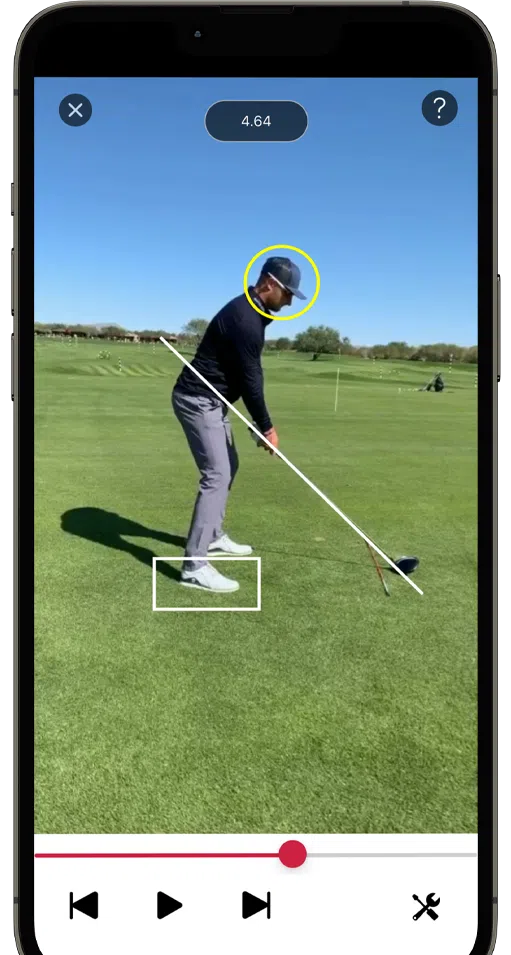
The analysis tools are polished and mature. Frame-by-frame playback, drawing tools across six colours, side-by-side and overlay comparison, skeletal tracking that identifies body positions through clothing, and Ball Tracing that visualises flight path without a radar — these are well-implemented features that have been refined over many iterations. The model swing library covering PGA, LIV, and LPGA professionals is the most comprehensive available in any consumer app.
The App Store rating of 4.0 from 1,700 reviews reflects a genuine split in user experience. Golfers using V1 with an instructor consistently rate it highly — the connected lesson delivery system works well and customer support is frequently praised. Golfers attempting to self-coach without an instructor find the drawing tools require expertise they do not have, and without AI analysis to identify faults, the app shows you your swing without telling you what is wrong with it. Those users tend to be disappointed.
At $119.99 per year — approximately £95 — V1 Golf is the most expensive subscription in this guide. The honest question is whether the price is justified for a self-coaching golfer in 2026, when AI analysis apps like Sportsbox AI identify faults and prescribe drills for less. The answer depends entirely on whether you have a coach who uses V1. If you do, the connected lesson platform makes it worth every penny. If you do not, other apps in this guide offer more for less.
Free version verdict
Useful for recording and cloud storage. The free QuickFix — one real coach swing review — is worth using before deciding whether to subscribe.
Best for
Golfers who already work with a PGA professional or coach who uses V1 Sports. The instructor-connected lesson platform is the primary reason to choose V1 over other options.
Subscription worth it?
Yes if your coach uses V1 — the connected lesson delivery system justifies the cost. At approx £95/year it is hard to justify purely as a self-coaching tool when AI analysis apps offer more guidance for less. Use the 7-day trial and the free QuickFix first.
Sportsbox AI
iOS · Android · iPad · Web portal4.9 from 3,200 ratings (iOS) · Used by Bryson DeChambeau and endorsed by Golf Digest Top 50 instructors worldwide
IMPORTANT — PLAYER VS PROFESSIONAL TIERS
Sportsbox AI has two very different subscription levels. The 3D Player plan (approx £87/year) gives you six core body measurements and 50-plus practice drills — useful for self-coaching with specific, measurable goals. The full measurement suite — all trackers and indicators across every part of the swing — is in the 3D Pro professional tier at $799.99/year, which is designed for teaching professionals managing multiple students. Most of the detailed measurements shown in Sportsbox marketing materials and used by Tour-level coaches are in the Pro tier, not the player plan. Be clear about which tier you need before subscribing.
Free plan
5 swing analyses per month. 1 Sportsbox-recommended goal with limited measurements related to that goal. View swings captured by a 3DGolf coach. Free 3D swing assessment offer: submit a swing and a Sportsbox expert coach provides a free personalised 3D analysis and goal — no subscription required.
3D Player — $9.16/month ($109.99/year) or $15.99/month — 14-day free trial available
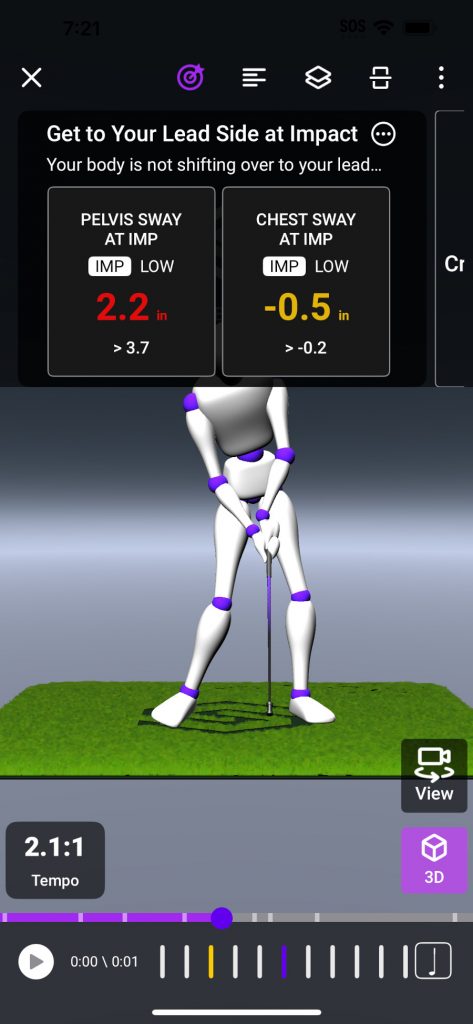
Unlimited swings and unlimited goals. 2D and 3D analysis and comparison. Auto swing detection. 3D avatar of your swing viewable from six angles. 50-plus practice drills with progress assessments. Inbox to communicate with a connected coach. Measurements included: Chest Turn, Pelvis Turn, Chest Sway, Pelvis Sway, Chest Lift, Pelvis Lift. Note: full tracker and indicator suite is available in the professional 3D Pro tier (for coaches) — not in the player subscription.
Player subscription approx £87/year at current rates. Pricing in US dollars. The professional 3D Pro coaching tier ($799.99/year) is for teaching professionals and is not the player subscription. 14-day free trial available.
Our view
Sportsbox AI does something no other app in this guide does: it creates a full 3D animated model of your swing from a single slow-motion video taken on a standard phone camera. Not a 2D video with lines drawn on it — a three-dimensional avatar of your body moving through the swing, viewable from six different angles including from above and below, without any sensors or markers.
The biomechanical measurements this produces are meaningfully different from video analysis. When your pelvis turn at the top measures 34 degrees and the tour player range is 45 to 55 degrees, you have a specific, measurable number to work towards rather than a general instruction to turn more. The 3D Player subscription gives you six core measurements covering chest and pelvis turn, sway, and lift — enough to identify the most common swing faults and set quantifiable goals.
The endorsement list reflects how seriously the teaching community takes the technology. Sean Foley, David Leadbetter, Mike Adams, and multiple other Golf Digest Top 50 instructors use Sportsbox in their lessons. Bryson DeChambeau uses it to prepare for majors. These are coaches who have integrated it into professional practice, not marketing endorsements.
The honest picture for self-coaching golfers: the player subscription is genuinely capable for the six included measurements, but the full analytical depth shown in Sportsbox's own marketing — the complete tracker and indicator suite used by Tour coaches — is in the professional tier. The app produces accurate and objective data, but translating measurements into swing changes benefits significantly from coaching knowledge.
The free 3D swing assessment — submit a video, receive a personalised analysis from a Sportsbox coach at no cost — is worth using before subscribing. It gives you a clear picture of what the platform will show you and whether the measurements are actionable for your game.
Free plan verdict
Limited to 5 swings per month but the free 3D swing assessment from a real coach is worth doing regardless of whether you subscribe.
Best for
Technically-minded golfers who want objective biomechanical measurements and quantifiable swing goals. Most effective when used alongside a Sportsbox-certified instructor who can interpret the full data set.
Subscription worth it?
Yes for golfers who will engage seriously with measurable 3D goals. At approx £87/year the 3D Player plan gives you six core body measurements and 50-plus drills. Understand that the full measurement suite requires the professional tier. Use the 14-day free trial to assess before committing.
Coach Now
iOS · Android · iPad · Apple Watch · Web · macOS4.9 from 11,000 ratings (iOS) · 1 million coaches and athletes across 60+ sports in 140+ countries
PRIMARILY A COACH-ATHLETE PLATFORM
CoachNow is built around the relationship between a coach and athlete rather than solo self-analysis. Its strongest use case is when your PGA professional or instructor uses it to deliver lesson videos, annotated feedback, and drill content directly to your phone between sessions. As a standalone self-coaching tool it provides good video analysis features, but the communication and content delivery tools that make it genuinely powerful require a coach to be on the other end. The Analyze tier at approx £47/year is worth considering if you have an online instructor or want to organise your own swing video library with proper analysis tools.
Free version
Download and create a free account. Basic access to explore the platform. 7-day free trial of any paid plan available. The free tier itself has limited functionality — CoachNow is designed around active plan use.
Analyze — $4.99/month billed annually (approx £47/year) or monthly option available
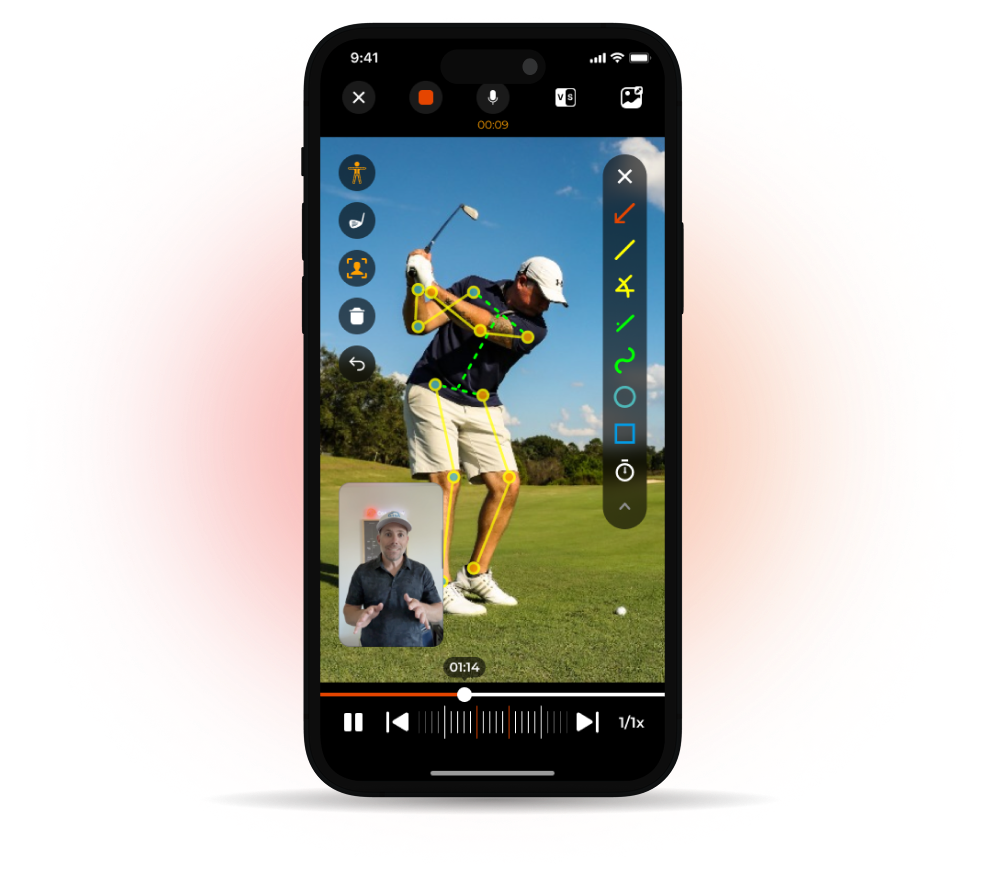
Premium video and image analysis suite. AI skeleton tracking — tap any joint to see its current angle. Slow motion playback up to 240fps. Annotation tools — angles, shapes, circles, lines, timers. Side-by-side comparison (VS Mode) and video overlay. Unlimited voiceover recordings. CoachCam — activate front camera during voiceover so athletes see you in a picture-in-picture window. 250 files cloud storage. Up to 3 Spaces (private channels for tracking progress). 7-day free trial included.
CoachNow+ — for coaches managing multiple athletes
Everything in Analyze plus: Unlimited Spaces and Groups. 150GB cloud library. Templates and lists for automation. Smart lists. Automated template builder. Full video analysis suite.
Analyze pricing approx £4/month or £47/year — the most affordable subscription in this guide. Pricing in US dollars. CoachNow+ and CoachNow PRO tiers are designed for coaching professionals managing larger rosters. 7-day free trial available on all plans.
Our view
CoachNow is the highest-rated coaching app in the world by App Store rating — 4.9 from 11,000 reviews across one million users in 60-plus sports. That credibility reflects over a decade of development in a category the company essentially created: asynchronous coach-athlete video communication.
The platform's core proposition is simple — your coach records a voiceover analysis of your swing with annotation tools and sends it to your phone. You watch it at home, take it to the range, and reply with new footage. Between lessons you have a permanent record of every piece of feedback, every drill, and every swing comparison. CoachNow's innovation was turning a coach's phone into a lesson delivery system rather than just a recording device.
The video analysis tools in the Analyze tier are genuinely strong for the price. AI skeleton tracking identifies joint angles instantly. Slow motion to 240fps captures positions that are impossible to see at full speed. The annotation tools — angles, shapes, timers — are professional-grade. The CoachCam feature, where your coach appears in a picture-in-picture window while annotating your video, adds a personal dimension that screen-captured analysis cannot replicate.
The Live MultiCam feature is worth noting specifically. Using multiple devices simultaneously, it captures your swing from face-on, down-the-line, and any other angle in a single session — automatically synchronised. This is the kind of multi-camera capture that used to require professional studio equipment.
The honest assessment for a self-coaching golfer: CoachNow's communication and delivery tools are most valuable with a coach at the other end. The analysis tools work well independently, but without someone sending back annotated lessons, you are paying for features you will not fully use. At approximately £47 per year the Analyze tier is the lowest-priced subscription in this guide, which makes it reasonable even as a video library and analysis tool on its own.
Free version verdict
Very limited — CoachNow is a subscription platform. The 7-day trial gives you a proper assessment of whether it suits how you work with your coach.
Best for
Golfers who work with a PGA professional or online instructor who uses CoachNow for lesson delivery. Also worth considering as a personal video library with professional analysis tools at the lowest subscription price in this guide.
Subscription worth it?
Yes if your coach uses CoachNow — the connected lesson delivery system is excellent. At approx £47/year Analyze is the most affordable subscription in this guide and justifies itself even as a standalone analysis tool. The real value unlocks with an instructor on the other end.
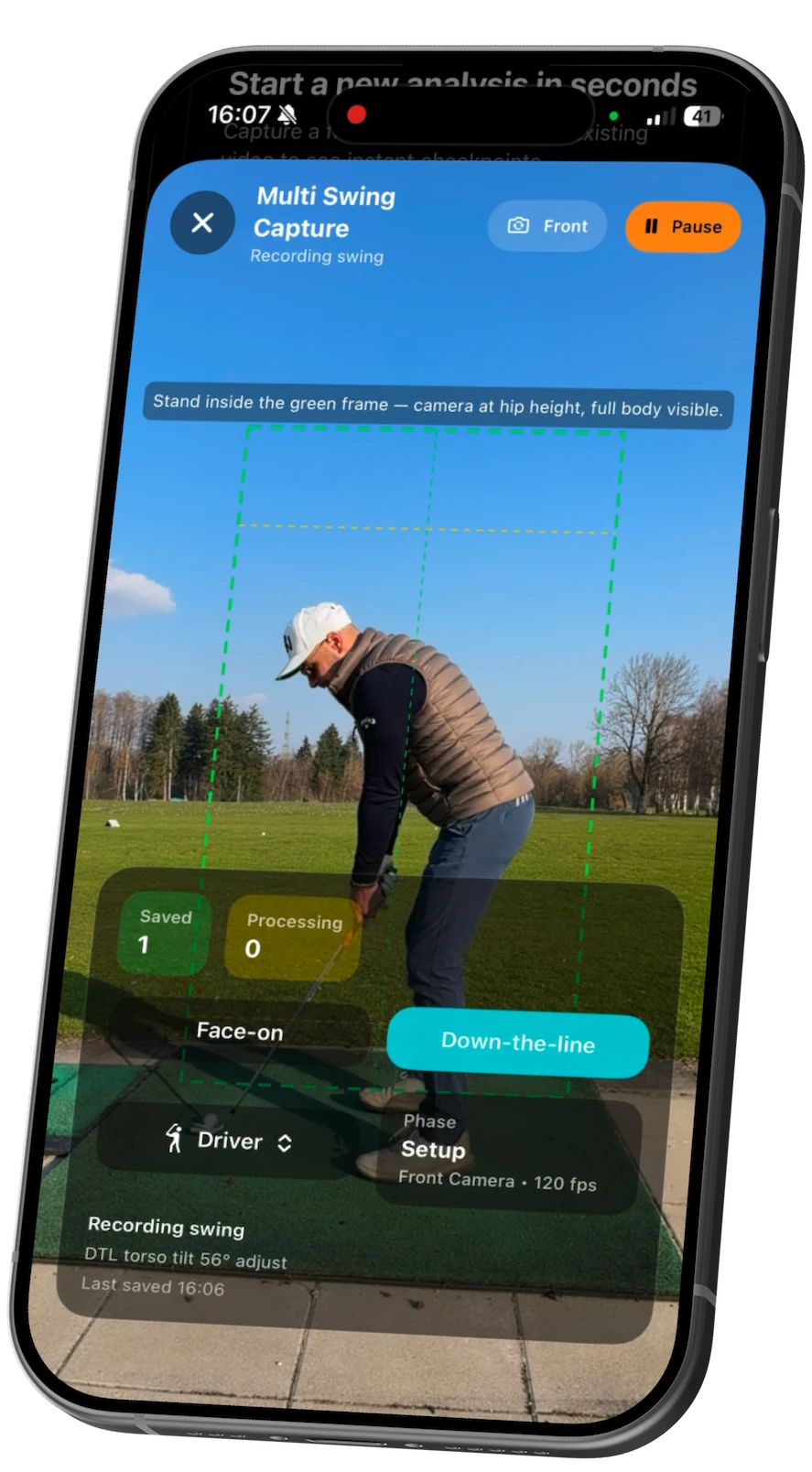
DeepSwing
iOS · iPad · Apple Watch only — no Android version5.0 from 6 ratings (iOS) — Version 3.0.1 released May 2026. Too few ratings to draw conclusions — treat as a new app.
iOS AND APPLE ECOSYSTEM ONLY
DeepSwing requires iOS 17 or later and works across iPhone, iPad, and Apple Watch. It is Vision Pro ready. There is no Android version. All AI processing happens on-device — no account required and no video uploads to the cloud. This makes it fully GDPR-compliant, which is relevant for UK users.
Free version
Record or import swing videos. Basic AI analysis with limited results. View top issues at summary level. Select club type for club-aware coaching tips. A selection of Academy content. No account required.
DeepSwing Pro — £49.99/year (UK App Store price) — 7-day free trial
Unlimited swing captures and video imports. Full AI analysis results — phase scores, kinematic angles, outcome tendencies (slice, hook, fat, thin). Live Coach — real-time voice, haptics, and audio feedback while you swing. 3D Ghost Overlay comparing your posture and swing plane to a pro model face-on and down-the-line. 3D skeleton playback viewable frame by frame. Advanced overlays: swing plane, hand path, club movement, ball-flight visuals. Compare two swings in sync with drawing tools. MirrorVision — mirror the live session to a second screen for coach or partner review. Apple Watch control: start Live Coach, recording, or countdown from the wrist. Full Academy lessons with videos and structured practice plans. Progress tracking and history dashboard.
UK App Store price: £49.99/year. German developer (Deep Platforms GmbH). All processing on-device — no cloud uploads required. 7-day free trial available.
Our view
DeepSwing is the newest app in this guide and the most privacy-conscious. All AI processing happens on-device — your swing videos are never uploaded to a cloud server, no account is required to use the app, and there are no trackers. For UK golfers who are cautious about where their data goes, this architecture is a meaningful differentiator.
The on-device approach also means the app works without an internet connection — useful at remote courses or indoor ranges with poor connectivity.
The feature set punches well above the price point. The Live Coach delivers real-time voice, haptics, and visual feedback while you are mid-swing, not after the fact. The 3D Ghost Overlay places a pro model's swing plane and posture over your own video so you can see the difference between your swing and the ideal in a single frame. Phase-based scoring breaks your swing into setup, backswing, top, downswing, impact, and finish — each scored against ideal ranges — so you can identify where in the sequence the fault originates rather than just seeing the end result.
The Apple Watch integration is thorough. You can start the Live Coach, trigger recording, or set a countdown from the watch without touching the phone. For solo range sessions this keeps the workflow clean and fast. The MirrorVision feature allows a second device — an iPad, Mac, or another iPhone — to display the Live Coach analysis in real time, which makes it useful in lesson environments where a coach wants to see the same data without crowding around one phone.
The honest caveat is that this app is very new. The App Store shows 5.0 from only 6 ratings, which is statistically meaningless — it could just as easily be 4.2 with 500 ratings. The product is at version 3.0.1 as of May 2026, which suggests active development but limited long-term user testing. The 7-day free trial is the sensible way to assess it before committing.
Free version verdict
Limited — basic analysis only. The 7-day Pro trial gives a proper assessment of the full feature set before subscribing.
Best for
iPhone users who want AI coaching with complete privacy — no cloud uploads, no account required. Also well-suited to golfers who practise in locations without reliable internet and want a full coaching workflow on the Apple ecosystem.
Subscription worth it?
At approx £51/year it is among the best-value subscriptions in this guide for the feature depth delivered. The privacy architecture and on-device processing are genuine differentiators. Use the 7-day trial — the Live Coach and 3D Ghost Overlay features are the ones to assess.
Different category
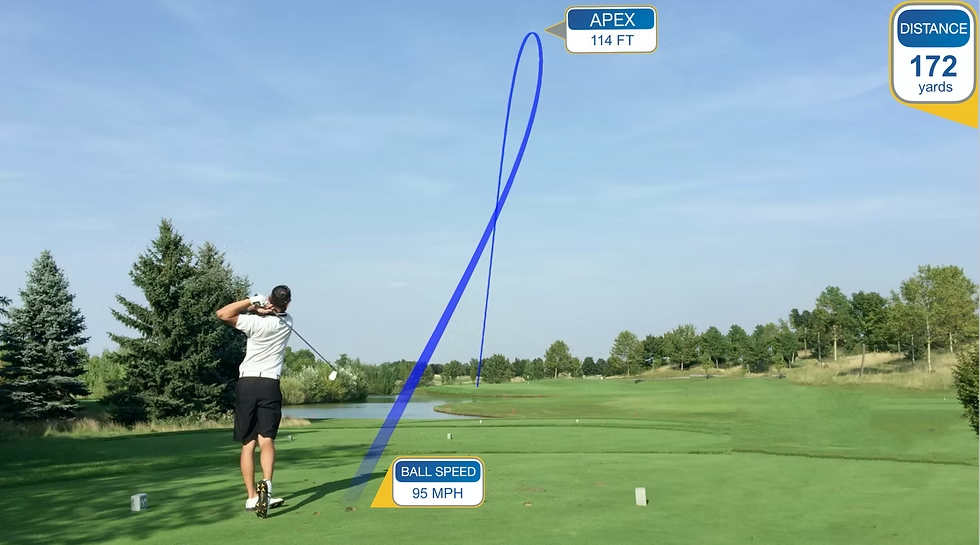
Shot Tracer is not a swing analysis app. It traces ball flight in video for content creation purposes — the same tracer lines you see on YouTube and social media golf videos. We have included it here because it is frequently searched alongside swing analysis tools, but it does not analyse your mechanics or give coaching feedback. If you are looking for swing feedback, the five apps above are the relevant tools.
Shot Tracer
iOS · Android · macOS · Windows3.6 from 11 ratings (iOS) — one-time purchase, not a subscription
WHAT THIS APP ACTUALLY DOES
Shot Tracer traces the flight path of your golf ball in video footage — it does not analyse your swing mechanics or give coaching feedback. It is a video content creation tool. The tracer lines you see on YouTube golf channels are created with Shot Tracer or its professional desktop equivalent. We have included it here because it is frequently searched alongside swing analysis apps, but if you are looking for swing mechanics feedback, the five apps above are what you need.
Purchase price — $5.99 one-time (approx £5)
Realistic ball flight tracer — animate carry, distance, and shot shapes on any video. Works on any course, no special hardware required. 3D Map Tracer — bird's eye view of your shots on 45,000-plus golf courses with hole flyovers and shot replays. Golf Video Editor — create professional-quality videos with broadcast-style custom scoreboard editor, voice overlays with automatic captions, custom text, images, and graphics. Professional Scorecard Editor — 44,000-plus course database with animated scorecard designs. AR Green Reading and Putt Line — augmented reality putt lines showing slope and break. AR Tracer Fun Mode — hit targets, shoot down UFOs, and create social media content. Swing Tracer — strobe-motion swing tracers at 120fps and 240fps.
$5.99 one-time purchase — the only app in this guide with no subscription. A separate Shot Tracer Pro app exists with additional features at a subscription price. Available on iOS, Android, macOS, and Windows. Features vary by platform — the iOS app is the most fully featured. Voted Best Golf App by Golf Digest and Golf Magazine.
Our view
Shot Tracer is the only app in this guide that serves a completely different purpose from the others. It does not analyse your swing or give coaching feedback — it traces the flight path of your golf ball in video footage and turns ordinary phone recordings into broadcast-style content. The tracer lines you see on YouTube golf channels, including those used by professional instructors in lesson videos, are made with Shot Tracer or its professional desktop equivalent.
The $5.99 one-time purchase is the entire cost — no subscription, no recurring fee. For that you get automatic ball flight tracing, 3D map overlays on 45,000 golf courses showing your shot from a bird's eye view, a full golf video editor with broadcast-style scorecards, voice overlays with automatic captions, and augmented reality putt lines showing break and slope.
The 3D Map Tracer feature is genuinely impressive for the price. Upload a round video and the app places your ball flight trajectory onto a satellite course view — the same overhead shot-tracing you see on television coverage. For golfers who play content creator rounds or want to share their game visually, this is the most accessible route to professional-looking footage.
The automatic ball tracking requires good filming conditions. A stable tripod, filming from the side rather than straight down the line, and good lighting all significantly affect whether the auto-trace picks up the ball correctly. Reviews note that manual adjustment is sometimes needed — the 3.6 App Store rating from only 11 reviews reflects a split between enthusiastic users and those who found the auto-tracking frustrating without proper setup.
The app is available on iOS, Android, macOS, and Windows, which makes it one of the most accessible in the guide in terms of platform coverage. The desktop PC and macOS versions are particularly capable for more involved video editing — the same technology used by professional YouTube golf channels. For golfers who want swing mechanics analysis this is not the right tool. For golfers who want to share their game as content — or who want to create professional-quality lesson videos — it is exceptional value at £5 with no ongoing cost.
Purchase verdict
Excellent value at approx £5 with no subscription. The 3D Map Tracer and Video Editor alone justify the cost for any golfer who shares their game online.
Best for
Golfers who create content — YouTube, Instagram, or social media — and want broadcast-style ball flight tracers and course flyovers. Also useful for teaching professionals creating lesson video content.
By use case
Find the right app for how you practise.
Instant feedback
I want to see my swing immediately.
Auto-capture and instant slow-motion replay without touching the phone. Set up, hit balls, watch each swing back. No assistant needed.
Top picks
- Swing Profile (free)— hands-free auto-capture, immediate slow-motion replay, no setup complexity
Coach integration
I work with a coach.
If your instructor uses V1 or Coach Now, working within their platform gives you far more value. Ask your coach before choosing. If they use neither, Swing Profile works well as a standalone recording tool.
3D motion analysis
I want data, not just video.
3D body motion analysis from a single phone video. Measures joint angles, rotation, and positions against tour averages. Most technically advanced option but benefits from being used alongside a coach.
Top picks
- Sportsbox AI— 3D body motion from single camera, joint angle data, tour benchmarks
Full comparison
All 6 apps compared.
| App | Platform | Free Version | AI Analysis | 3D Motion | Coach Integration | Subscription/yr |
|---|---|---|---|---|---|---|
| Swing Profile | iOS & Android | Yes (limited) | Yes | No | Yes | ~£80/yr |
| V1 Golf | iOS & Android | Yes (limited) | Basic | No | Yes | ~£55/yr |
| Sportsbox AI | iOS & Android | Yes (5/month) | Yes | Yes | Yes | ~£87/yr |
| Coach Now | iOS & Android | Yes | No | No | Yes | ~£47/yr |
| DeepSwing | iOS only | No | Yes | No | No | £49.99/yr |
| Shot Tracer | iOS, Android, PC | Yes (5 renders) | No | No | No | ~£5 one-off |
All prices approximate in GBP at May 2026 exchange rates. Full pricing details in each app review above.